
BioSonic vs BatExplorer
BioSonic is a browser-based alternative to Elekon BatExplorer that works with any bat detector, not just Batlogger. BioSonic's deep-learning model scored 98.7 percent F1 in independent benchmarks; BatExplorer has no published benchmark and uses rule-based parameter matching. Mac, Linux and tablet support, unlimited team users, automatic feeding-call separation, weekly model updates, and one-click reporting come standard.
Cloud-based deep learning on spectrograms vs Elekon's rule-based desktop analysis. Same WAV files, fundamentally different approaches.
At a glance
| Feature | BioSonic | BatExplorer (Elekon) |
|---|---|---|
| AI approach | Deep learning on spectrograms | Rule-based species library matching |
| Training data | 2.5M bat calls + 4M noise files | Elekon reference library |
| Benchmarked accuracy | 98.7% F1 score (Wilder Sensing) | Not publicly benchmarked |
| Platform | Browser-based — works on any computer | Windows only |
| Team workflow | Unlimited users, shared projects | Single-user desktop |
| Species per recording | Up to 7 | One suggestion with probabilities |
| Social & feeding calls | Separated automatically | Manual identification |
| Noise filtering | Deep-learning noise model | Basic filters |
| Model updates | New AI model every weekend | Irregular version releases |
| Cloud storage | 9 years EU-hosted | Local only |
| Report generation | One-click charts, maps, Word | Diagrams, charts, GIS export |
| Detector compatibility | Any WAV-producing detector | Designed for Elekon BATLOGGER |
| Geographic coverage | UK, NL, DK, DE, SE | European + UK species |
| Pricing | Per-GB, all-inclusive | Free Standard; 249 CHF/yr (~£212) Pro per user |
AI image recognition on spectrograms
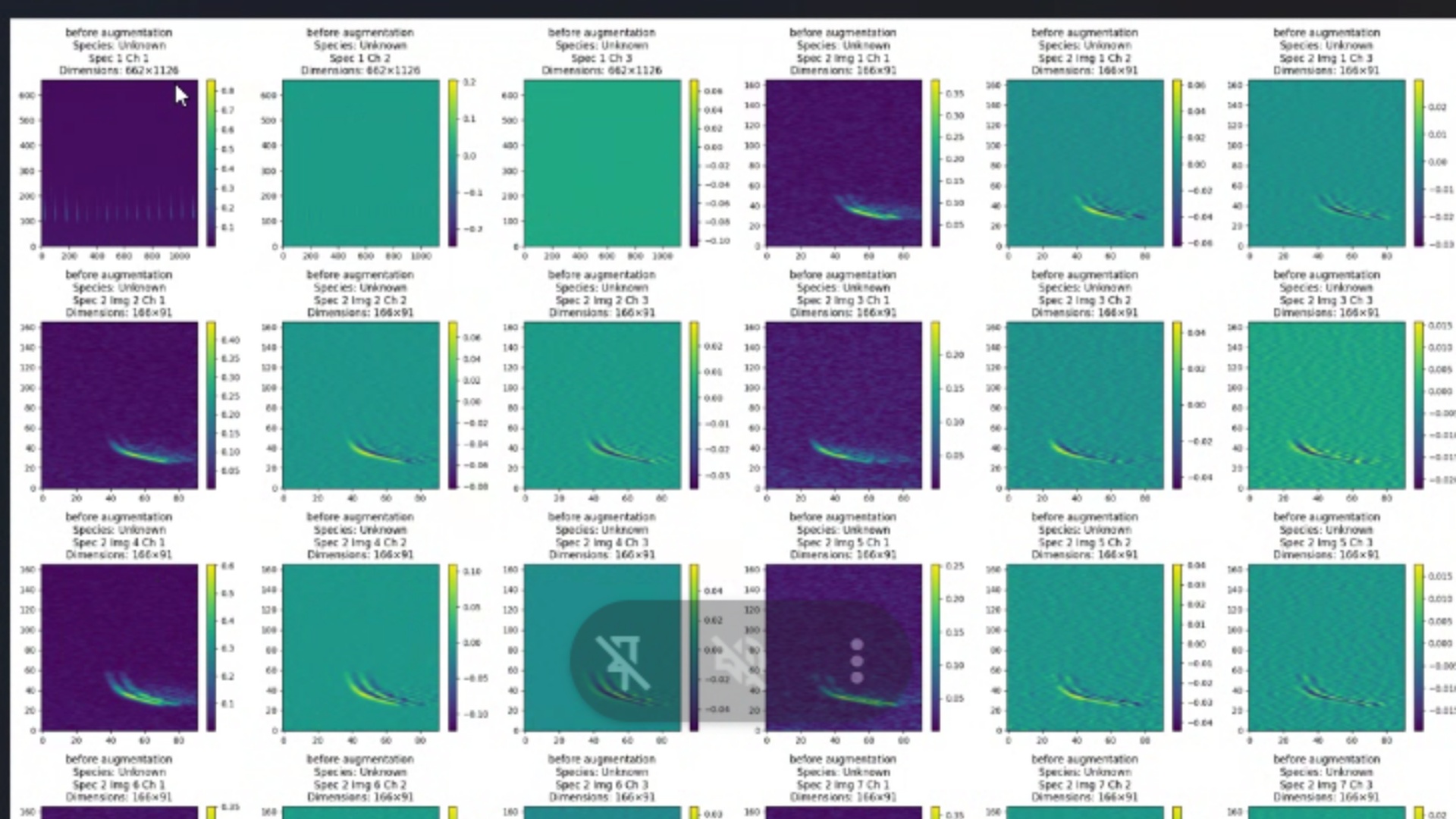
BioSonic converts each recording into a spectrogram image and runs it through a convolutional neural network trained on 2.5 million labelled bat calls. The model sees the full time-frequency picture, detecting multiple species, social calls, and feeding buzzes in a single pass.
BatExplorer takes a parameter-based approach: it measures call characteristics (start frequency, end frequency, duration, inter-pulse interval) and matches them against Elekon's species reference library, returning a single suggestion with probability scores.
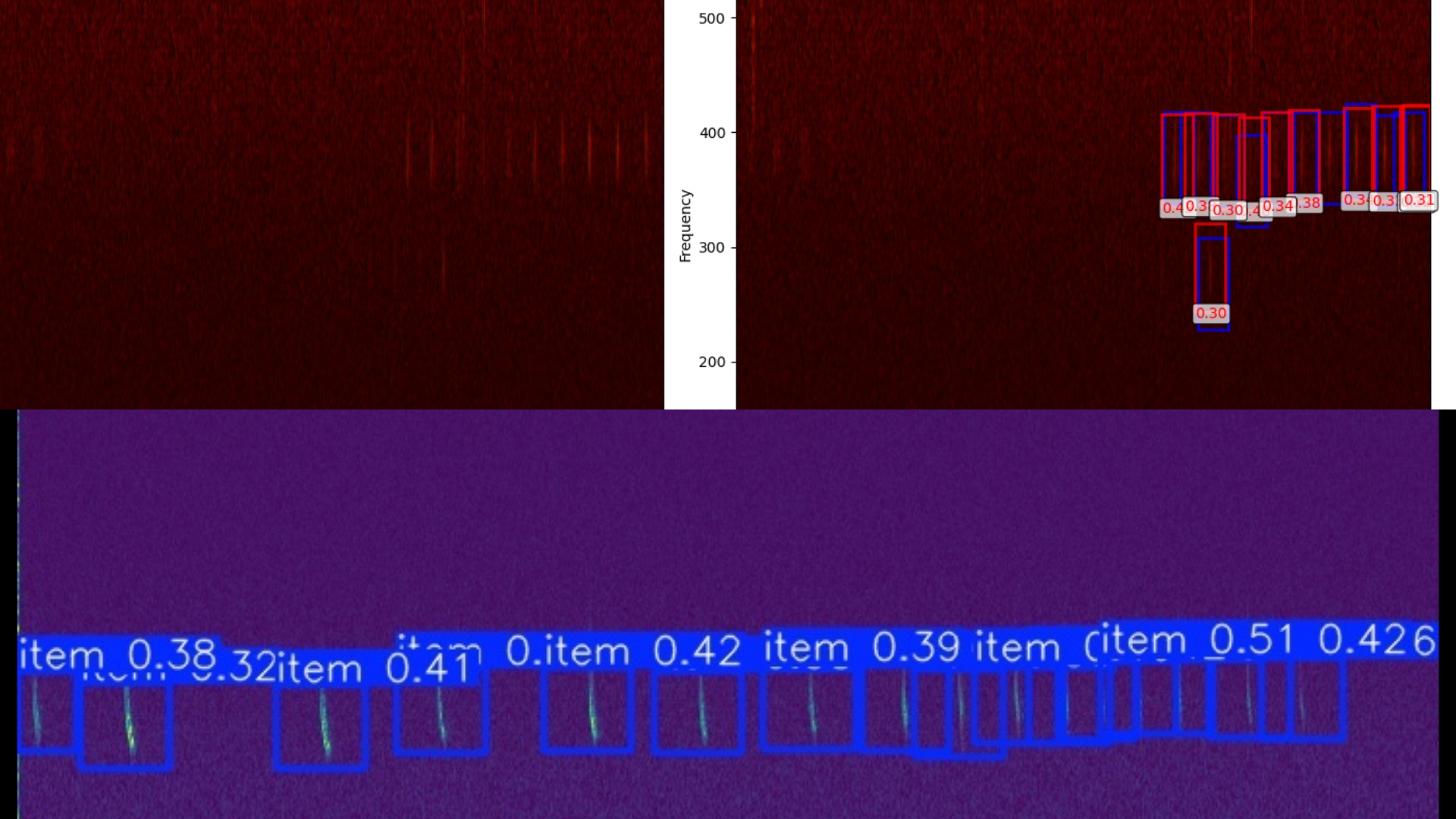
Trained on millions of examples
The model is curated by 12 bat experts across five European countries and retrained every weekend. 3.5 million noise files teach the AI to reject rain, wind, insects, and equipment noise before classification.
BatExplorer's reference library covers European species but relies on clean, well-separated calls to produce reliable parameter measurements. Overlapping species and noisy conditions reduce matching confidence.
BioSonic achieved 98.7% F1 score in the independent Wilder Sensing benchmark. No public benchmark for BatExplorer exists at the time of writing.
Have labelled recordings? We will run a free comparison. For full benchmark methodology, see the benchmarks page.
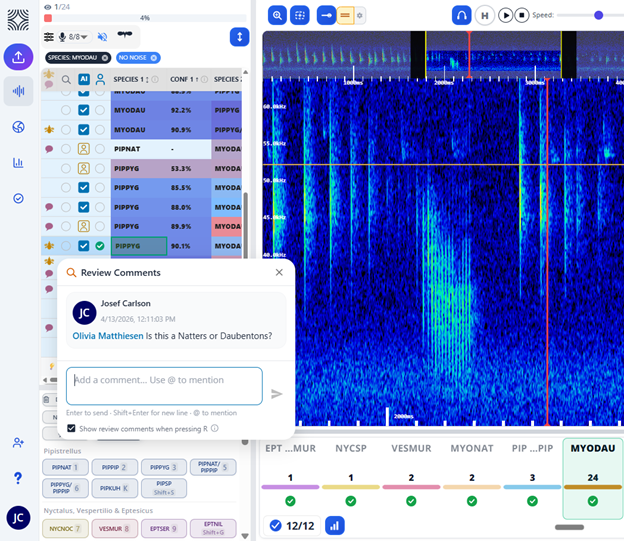
Spectrogram review
Inspect every call visually. Confirm or override AI classifications with right-click bounding boxes. Every decision is logged with a timestamp and user ID.
BatExplorer also displays spectrograms, but review is call-by-call on a single desktop machine with no shared audit trail.
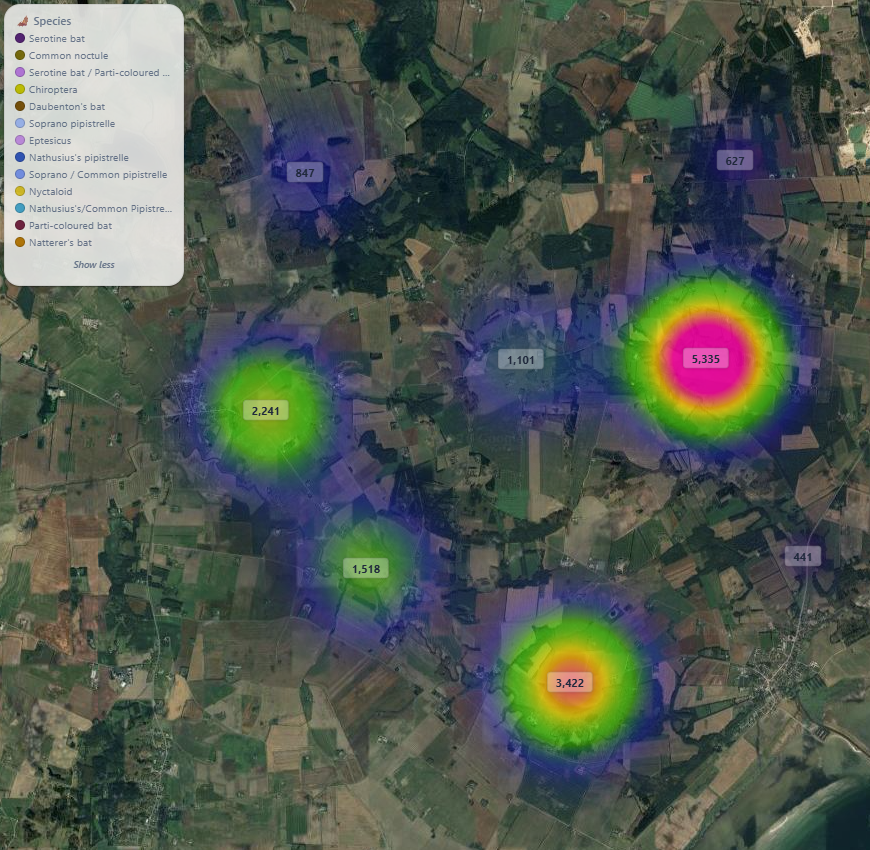
Species heatmaps
See bat activity across your entire site on an interactive map. Filter by species, date, or time of night. One click to export.
BatExplorer offers GIS export, but you build your own maps in external software.
Since joining BioSonic our analysis time has reduced significantly. The team is excellent in their support, super quick to respond.
— Luke Waddison, Senior Ecologist, Wharton (UK)
Emergence time analysis
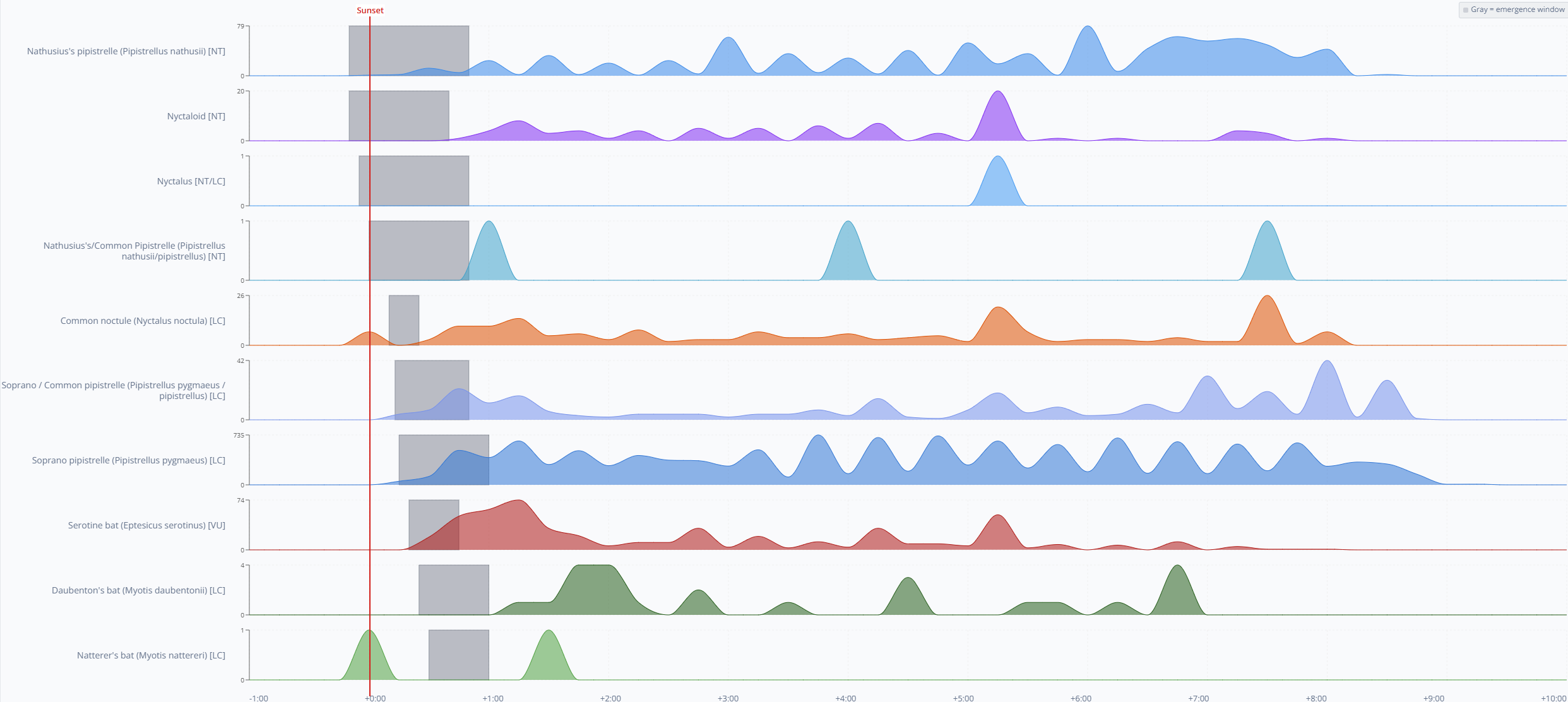
Automatic emergence graphs pinpoint when bats leave roosts. Crucial for roost characterisation reports.
BatExplorer does not generate emergence graphs. You export data and build them manually in Excel.
Weather integration
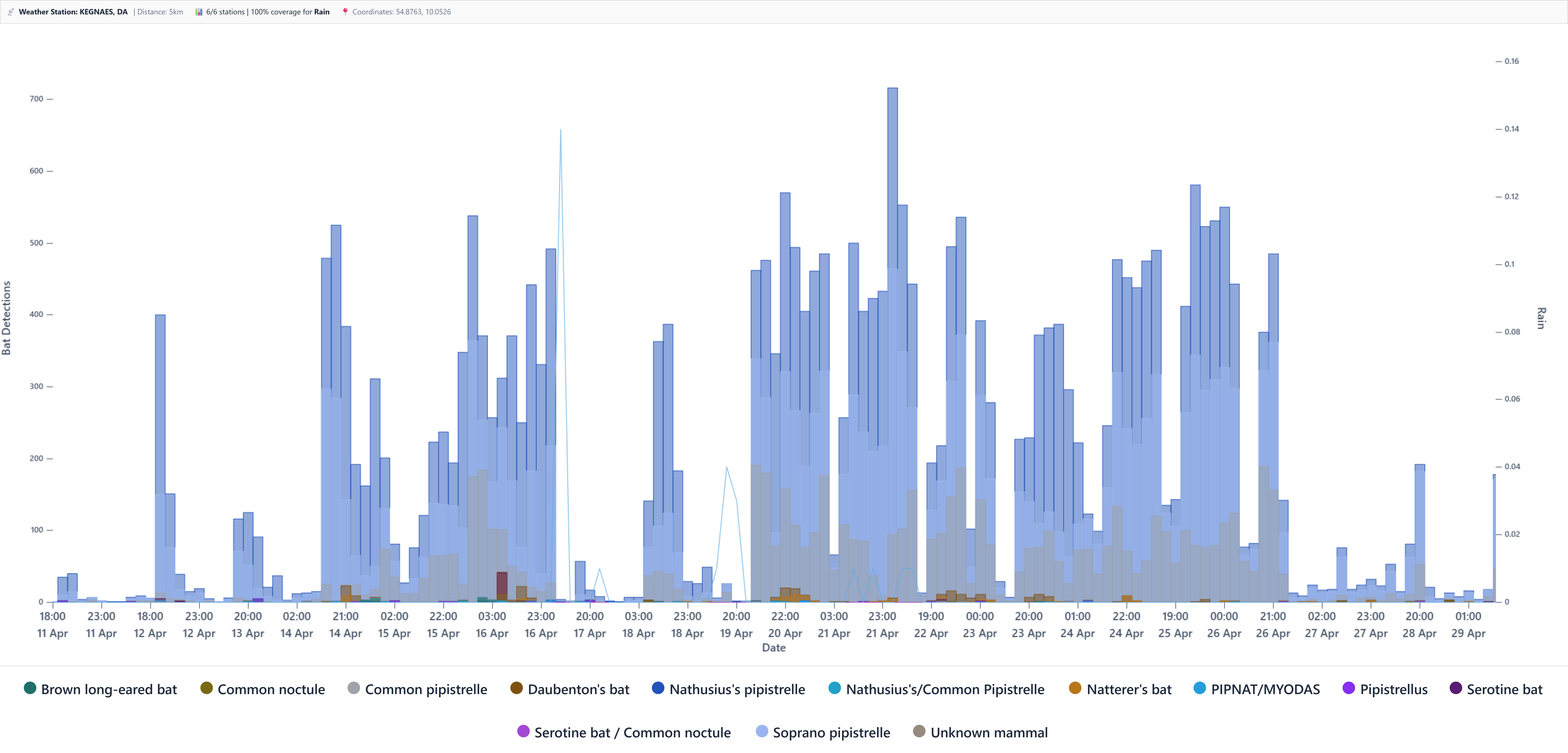
BioSonic automatically overlays temperature, wind, and rain data on your activity charts. No manual data entry.
BatExplorer does not integrate weather data. You source and merge it yourself.
Choose BioSonic
- Want the highest benchmarked accuracy — 98.7% F1 means less time fixing wrong classifications
- Consultancy team — unlimited users, shared projects, single audit trail
- Use any bat detector brand — not just Elekon
- Integrated spectrogram review with right-click bounding boxes — no switching apps
- One-click charts, maps, emergence graphs, weather overlays, Word reports
- Up to 7 species per recording with automatic feeding buzz and social call separation
Choose BatExplorer
- Use Elekon BATLOGGER and want tight hardware integration
- Prefer working offline on your own computer
- Work alone and do not need team features
- Want a free tool for manual spectrogram viewing
Some teams use both — BatExplorer for quick field checks, BioSonic for full project analysis.
Can I use BatExplorer with non-Elekon detectors?
BatExplorer can import WAV files from other detectors, but it is designed and optimised for Elekon BATLOGGER hardware. Some features and metadata integration may be reduced when using recordings from other manufacturers. BioSonic accepts standard WAV files from any detector without reduced functionality.
Is BatExplorer free?
BatExplorer offers a free Standard version with basic spectrogram viewing and manual analysis features. The Pro version, which includes auto-identification and advanced analysis tools, costs 249 CHF per year (approximately £212) for a Pro licence. BioSonic uses a per-GB-per-year model with all features included from day one.
How does BioSonic's accuracy compare to BatExplorer?
BioSonic achieved 98.7% F1 score in the independent Wilder Sensing benchmark. No public head-to-head benchmark between BioSonic and BatExplorer currently exists. Have labelled recordings? We will run a free comparison. See our benchmarks page for full details.
Can I switch from BatExplorer to BioSonic?
Yes. BioSonic accepts standard WAV files, so you can upload the same recordings you have been analysing in BatExplorer. There is no lock-in or conversion step. Upload your files, and BioSonic processes them automatically. You can run both tools in parallel to compare results. Start a free trial to test it with your own data.
Does BioSonic work on Mac or Linux?
Yes. BioSonic is browser-based and runs on any operating system with a modern web browser, including Windows, macOS, Linux, and tablets. BatExplorer runs on Windows only.
Which tool is better for team projects?
BioSonic is designed for team collaboration with unlimited users per organisation, shared projects, and centralised cloud storage. BatExplorer is a single-user desktop application with per-seat licensing. If multiple ecologists need to access the same project simultaneously, BioSonic is the more practical choice. For more on how teams use BioSonic, see the Wharton case study.
How often are the AI models updated?
BioSonic deploys a new AI model every weekend, incorporating the latest training data and improvements. BatExplorer receives version updates on an irregular cadence, typically tied to software releases from Elekon. Weekly updates mean BioSonic's accuracy improves continuously without any action required from the user.
- BatExplorer v2.3 (September 2025): 32-species European library, Windows 10/11 + .NET 4.8
- Elekon AG pricing: 249 CHF/year Pro subscription
Last verified: 2026-04-26.
BioSonic vs Kaleidoscope Pro
98.7 percent F1 vs 73.0 percent. 13.4x fewer false positives. Cloud vs desktop.
BioSonic vs SonoBat UK
Cloud AI vs 30 years of desktop vetting. UK plus 4 more countries vs UK only.
BioSonic vs BTO Acoustic Pipeline
Private cloud vs free-tier-with-data-sharing. 98.7 percent F1 vs unbenchmarkable.
Ready to try it?
See how BioSonic handles your recordings
Upload a batch of WAVs and compare results against your current workflow. No commitment, no credit card, no data sharing required.
Questions? Email josef.carlson@biosonic.se